

Prerequisites
Supported devices
- Managed Cisco WLCs, starting from Cisco 9800-series, running IOS XE 17.6 or higher
- NETCONF-YANG must be configured for telemetry to work, even if NETCONF is not used. For more information on configuring NETCONF-YANG, see the NETCONF Protocol module.
On-Premise Server
This guide assumes the prior completion of steps outlined in Deploy an on-premise gatewayInstallation
Create a Locatee Gateway API token
- Open Locatee Analytics
- Go to Admin > Data Sources > Gateways
- Create a new On-Prem type gateway
- Copy the generated token and note the gateway’s unique ID:
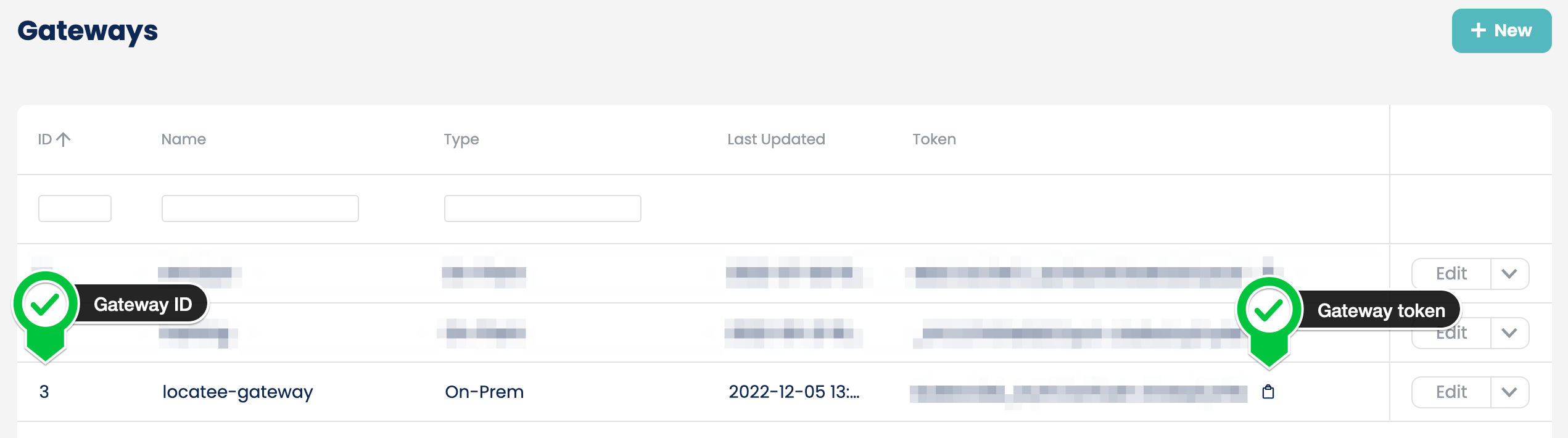
Configure Locatee IOS XE Gateway
- Modify existing compose YAML configuration located at
/opt/locatee/gateway/gateway.yamlto include iOS XE Gateway:
YAML
- Restart existing gateways:
Shell
- Monitor IOS XE Gateway logs for any errors:
Configure IOS XE WLC
Preliminary checks
- Check HTTP server status:
- Check NETCONF-YANG status:
Enable Telemetry subscriptions
- Configure the controller for wireless client readouts:
- Create telemetry receiver pointing to the IP:PORT of Locatee IOS XE Gateway:
- Confirm that the receiver has been successfully created. The output should include the information about the receiver:
- Configure the IOS XE telemetry subscriptions:
- Check receiver connection status. The output should include connection with IP address of Locatee Gateway with
ActiveState:
- Check subscription status. The output should include each subscription id configured in previous step with receiver in
Connectedstate:
Troubleshooting Telemetry subscriptions
Receiver connection isn’t Active or subscription status isn’t Connected
Please check the output of the following command:
Enable mTLS between Gateway & WLC (Optional)
Certificate Requirements
Communication between Cisco WLC IOS XE & Locatee gateway can be encrypted using mutual certificate authentication, which requires two sets of certificates. Both certificates should be signed by same CA.- Server Certificate & Private Key (for Locatee Gateway), further referred as
server.crt&server.key - Client Certificate(for WLC), further referred as
client.crt
Configure Locatee IOS XE Gateway with TLS
- Create a new directory
/opt/locatee/gateway/certificatesand copy server certificate, server key, root CA certificate (if CA is present) and client certificate there:
Text
- Modify existing compose YAML configuration located at
/opt/locatee/gateway/gateway.yamlto include mTLS settings:
YAML
- Restart existing gateways
Shell
- Monitor IOS XE Gateway logs for any errors:
Configure IOS XE WLC with TLS
- Configure the IOS XE trust point:
- Create CSR request:
- Copy the output of CSR into a separate file called
client.csrunder/opt/locatee/gateway/certificates - Sign Client CSR using CA to create cert
- Import Client Certificate back to Cisco IOS XE:
- Create telemetry receiver pointing to the IP:PORT of Locatee IOS XE Server Gateway using gRPC TLS Profile:
- Reconfigure IOS XE telemetry subscriptions to use receiver with TLS profile:
- Check receiver connection status. The output should include connection with IP address of Locatee Gateway with
ActiveState:
- Check subscription status. The output should include each subscription id configured in previous step with TLS receiver in
Connectedstate: